หลายคนคุ้นเคยกับ Control Panel มาตั้งแต่ Windows รุ่นเก่า พอมาเจอ Windows 11 หาเมนูเดิมไม่เจอเพราะ Microsoft ทยอยย้ายทุกอย่างไปไว้ใน Settings แทน บทความนี้สรุปให้ว่าเมนูเก่าแต่ละอันย้ายไปอยู่ตรงไหนใน Settings ใหม่
Control Panel ยังอยู่ไหม
ยังอยู่ครับ — Windows 11 ยังติดตั้ง Control Panel มาให้เหมือนเดิม เปิดได้ด้วยการกด Win + R พิมพ์ control แล้ว Enter แต่ Microsoft ไม่ทำทางลัดเข้าถึงง่ายๆ ให้อีกต่อไป เพราะต้องการให้ทุกคนย้ายไปใช้ Settings แทน
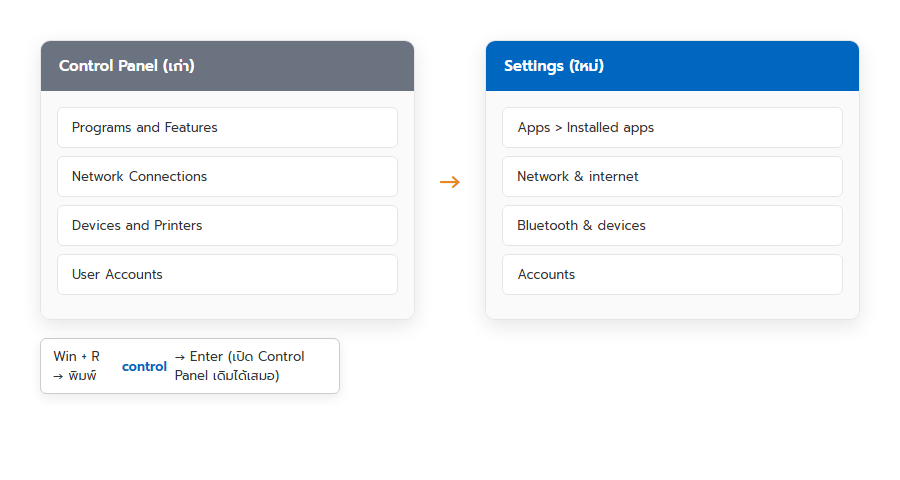
ตารางเทียบเมนูเก่า-ใหม่ที่ใช้บ่อย
| Control Panel (เดิม) | ย้ายไปที่ Settings |
|---|---|
| Programs and Features (ถอนโปรแกรม) | Apps > Installed apps |
| Network Connections | Network & internet |
| Devices and Printers | Bluetooth & devices > Printers & scanners |
| User Accounts | Accounts |
| Power Options | System > Power & battery |
| Display / Screen Resolution | System > Display |
| Windows Defender Firewall | Privacy & security > Windows Security |
| Date and Time | Time & language > Date & time |
| Fonts | Personalization > Fonts |
แล้วเมื่อไหร่ต้องกลับไปใช้ Control Panel เดิม
บางเมนูเฉพาะทาง (เช่น การตั้งค่าเครือข่ายขั้นสูงบางจุด, Backup and Restore แบบเก่า) ยังไม่ถูกย้ายมา Settings ครบ 100% ถ้าหาใน Settings ไม่เจอ ลองเปิด Control Panel เดิมดูได้เสมอตามวิธีด้านบน